An account holder signs in to a Japanese-language AI dashboard, opens the plan-change dialog, and moves the subscription from Premium plan ¥59,800 down to Free plan ¥0. The plan-change dialog carries the whole move, and the same dialog asks for a credit card before the Free plan takes effect. The card form opens even though the Free plan costs nothing, and the account keeps the registered card afterwards.
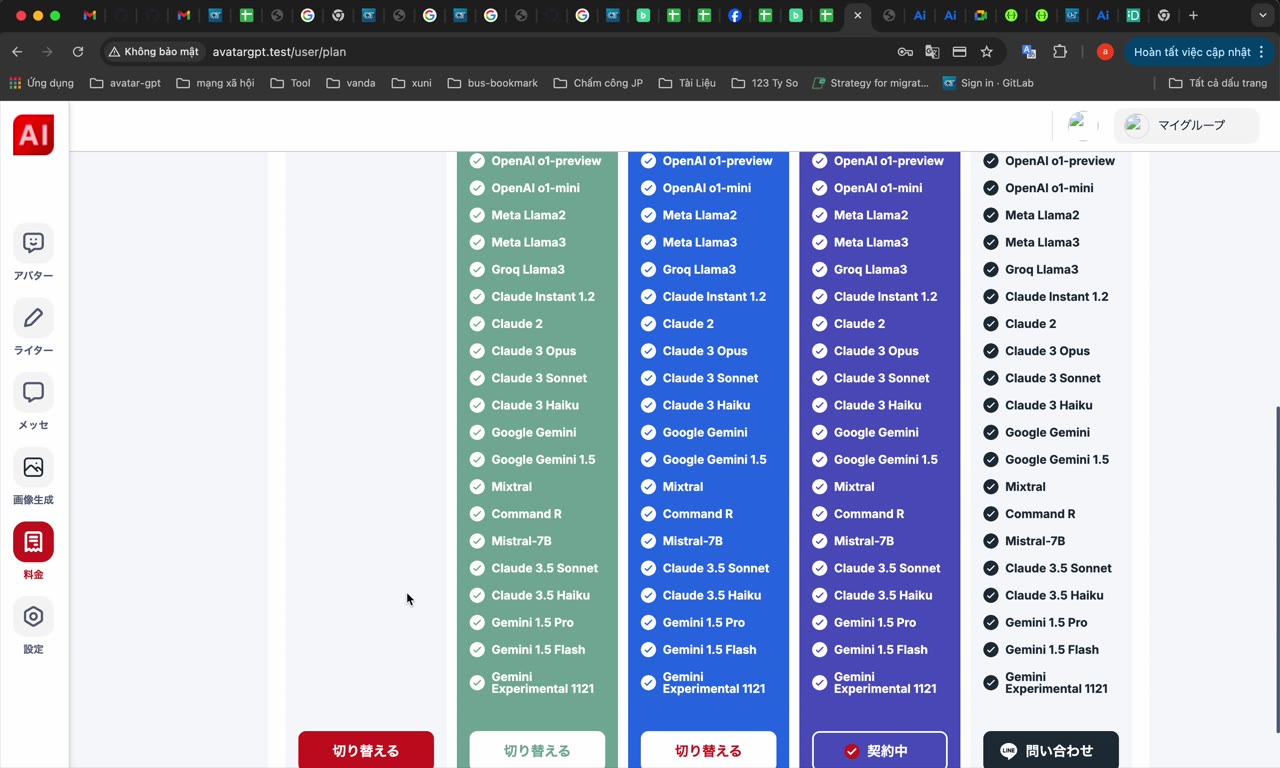
The AI dashboard opens as a white workspace with an 「AI」 logo, an icon rail down the left edge, and vertical colour-coded columns of model names in green, blue and indigo. A red action button sits at the bottom centre of the workspace. The plan-change modal opens over this workspace, so the model columns stay visible behind the dialog.
The sequence below follows one account through the full downgrade: the plan comparison, the 「クレジットカードを登録する」 form, the saved-card check, and the closing 「無料プランに変更しますか?」 question. Each screen is described by the Japanese labels that appear on that screen, with a plain-English gloss beside each label. The account holder answers the final question deliberately, because the confirmation dialog is where the downgrade is actually submitted.
Browser window showing a white workspace with an 「AI」 logo and icon rail on the left; four vertical columns of model names in green, blue and indigo; red button at bottom centre.
Before the downgrade: the account and the card
The account holder needs the AI dashboard open in a browser and signed in to the account that still carries the Premium plan. The plan-change dialog states the starting point as 「現在のプラン Premium plan ¥59,800」, so the current plan is confirmed on screen rather than assumed. The Premium plan has to be active at the start, because the dialog compares the current tier against the new one.
The preparation for the downgrade is small: a signed-in dashboard, a confirmed current plan, and a card with the card details to hand. None of that takes long to gather, and each item removes a pause later in the flow. The four requirements below cover the session, the plan confirmation and the card.
The AI dashboard open in a browser, signed in to the account being downgraded.
Confirmation that the account still holds the Premium plan, which the comparison screen shows as the current plan.
A payment card the account holder is willing to store, from Visa, Mastercard, JCB or Amex, the four brands marked on the comparison screen.
The card number, expiry date and security code to hand, so the modal does not sit open while the card is fetched.
The card requirement is the part that surprises people, and the comparison screen carries the accepted brand marks rather than the card form. A card from another brand may still work, but the four advertised marks are the safe choice. Having the card ready keeps the card form short and keeps the account holder from abandoning the downgrade halfway.
Opening the plan-change dialog and reading the two plan rows
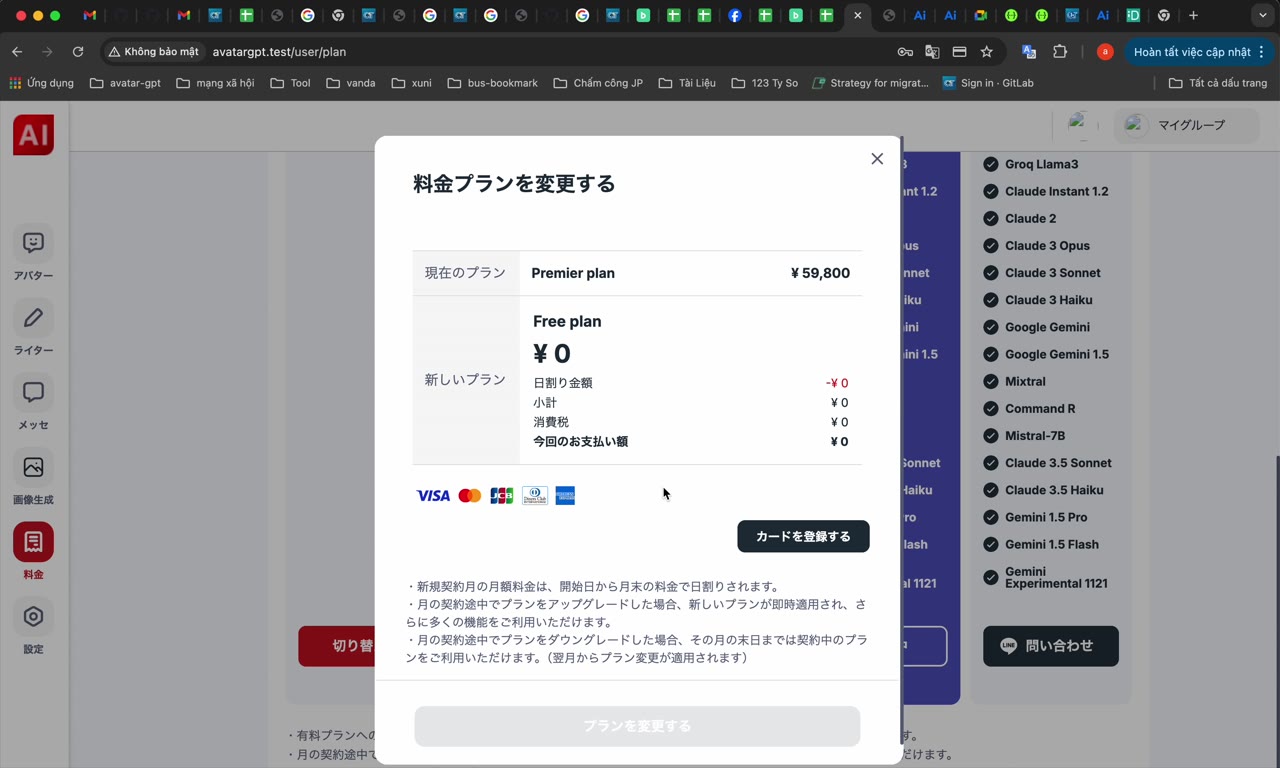
The account holder opens the account controls inside the AI dashboard and selects the option that changes the subscription. A white modal titled 「料金プランを変更する」 covers the workspace. The greyed row at the top reads 「現在のプラン Premium plan ¥59,800」, and the white card beneath reads 「新しいプラン Free plan ¥0」.
The greyed row is the plan being left, and the white row is the plan being taken up. Card-brand marks and a black button sit below the white Free plan row. Nothing on the comparison screen commits the downgrade, so both rows can be read at leisure before the black button is pressed.
Modal titled 「料金プランを変更する」: greyed current plan Premium plan ¥59,800 above a white card reading Free plan ¥0, card-brand icons and a black button.
The most common wrong turn is landing on the public pricing table instead of the plan-change dialog. A page with five columns of features and prices describes the tiers without touching the subscription. The account holder closes that page and reopens 「料金プランを変更する」 from inside the signed-in dashboard.
The comparison screen is also the last place where the two plan names appear side by side before the card form. That side-by-side view rewards a second look, because the card form names neither plan. Once the card form opens, the comparison sits behind the modal and the plan names are out of sight.
The card form appears even though the Free plan costs ¥0
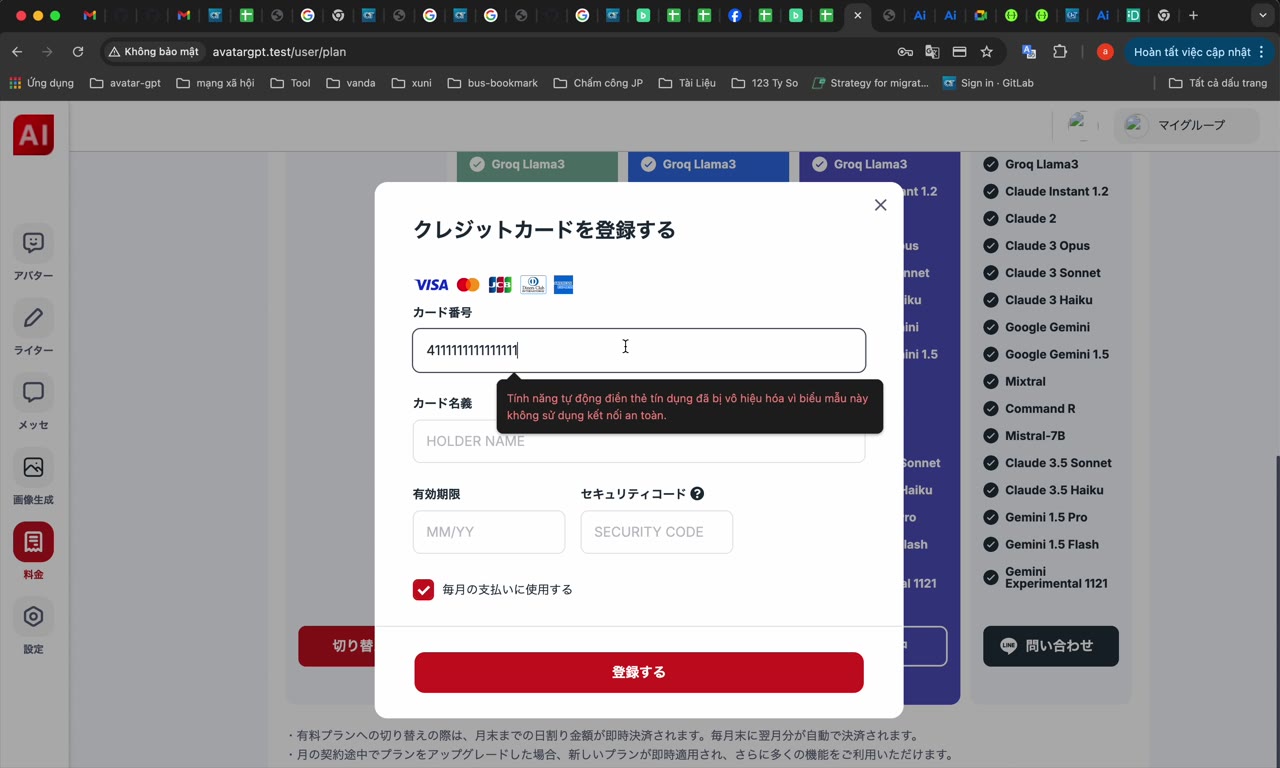
The move to ¥0 does not jump from the comparison to a yes-or-no question. The black button below the Free plan row opens a second modal titled 「クレジットカードを登録する」, which asks for a card number, an expiry date and a security code. The card form is a required stage of the downgrade, not a fault and not an optional extra.
The card form carries no explanation beyond its title, and the Free plan price never appears on the form. A red 「送信する」 button sits at the bottom of the modal and submits the card details. Once the card is accepted, the account carries the card from then on, including after the Free plan is active.
Modal titled 「クレジットカードを登録する」 with a card-number input covered by a dark autofill popup, expiry and security-code fields below, red 「送信する」 button.
The account holder types the card number into the card-number field, and a dark autofill popup drops over the field as the typing starts. The popup covers the field itself, so an entry from the popup is chosen only when that entry is the card meant for this account. The typing has worked when the popup closes and the characters sit in the card-number field.
The expiry date and the security code go into the two fields below the card number, and both values come from the physical card. Reading each value back against the card catches the usual mistake, which is a browser filling a saved card that the account holder did not intend to store. One press of 「送信する」 submits the card, and the card modal closes on success.
A card modal that stays open after 「送信する」, or reopens empty, means the card was not accepted. A mistyped digit, a swapped expiry month and a wrong security code are the usual causes. Nothing about the subscription has changed while the card form sits open, so a retry costs only the typing.
Checking which card the account picked up
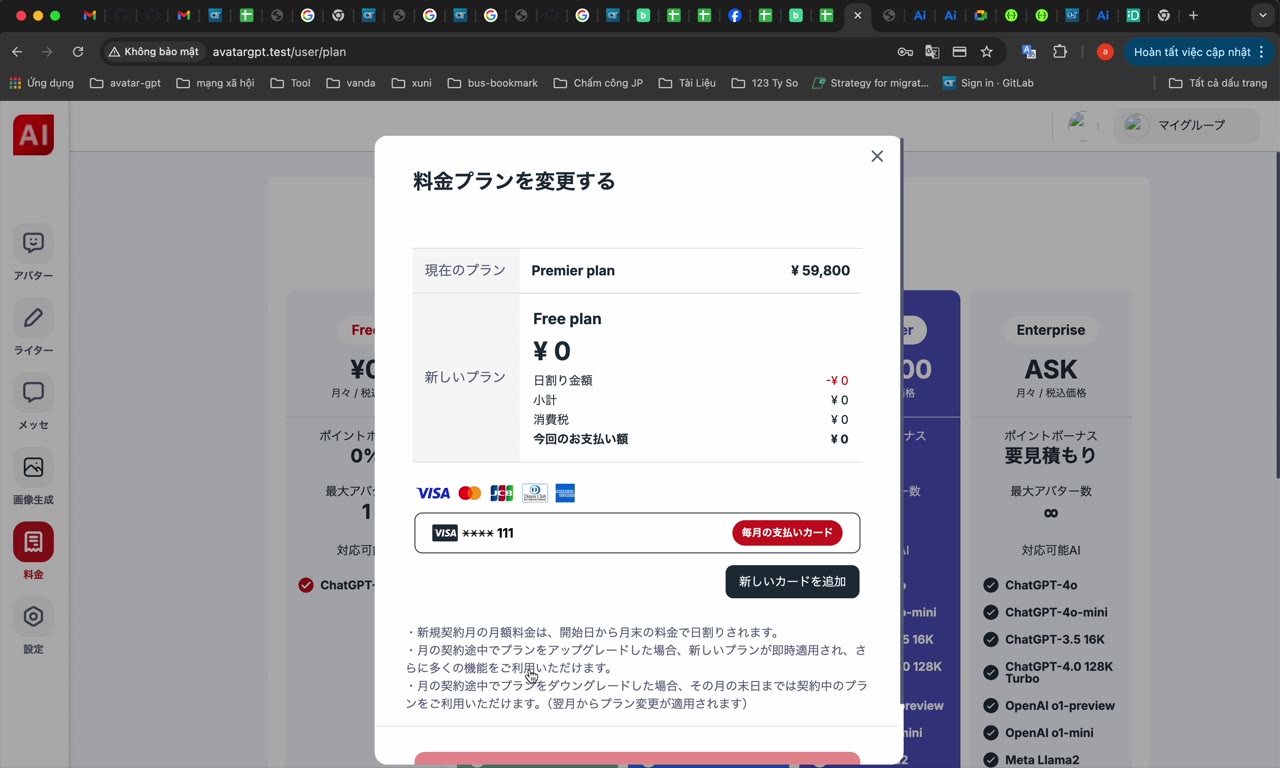
The plan-change modal returns with the comparison and a new masked row beside the plan names. The masked row reads 「•••• 4242」 and sits next to a link labelled 「別のカードを使用」. Only the last four digits appear, so the account holder checks those four digits against the card submitted a moment earlier.
When the four digits belong to the intended card, the card step is finished and the downgrade continues. When the four digits belong to another card, 「別のカードを使用」 reopens the card form, and a new submission replaces the masked row. The Free plan change costs nothing, but the account keeps whichever card was accepted last, so the check matters.
Plan-change modal again, now with a saved masked card row 「•••• 4242」 and a 「別のカードを使用」 link beside the plan comparison.
The masked row also shows that the card step and the plan step are separate events. A registered card means the account holds a card, not that the plan changed. The downgrade still needs the confirmation dialog, and the confirmation dialog is the only control that submits the move to Free plan ¥0.
Answering the final confirmation question
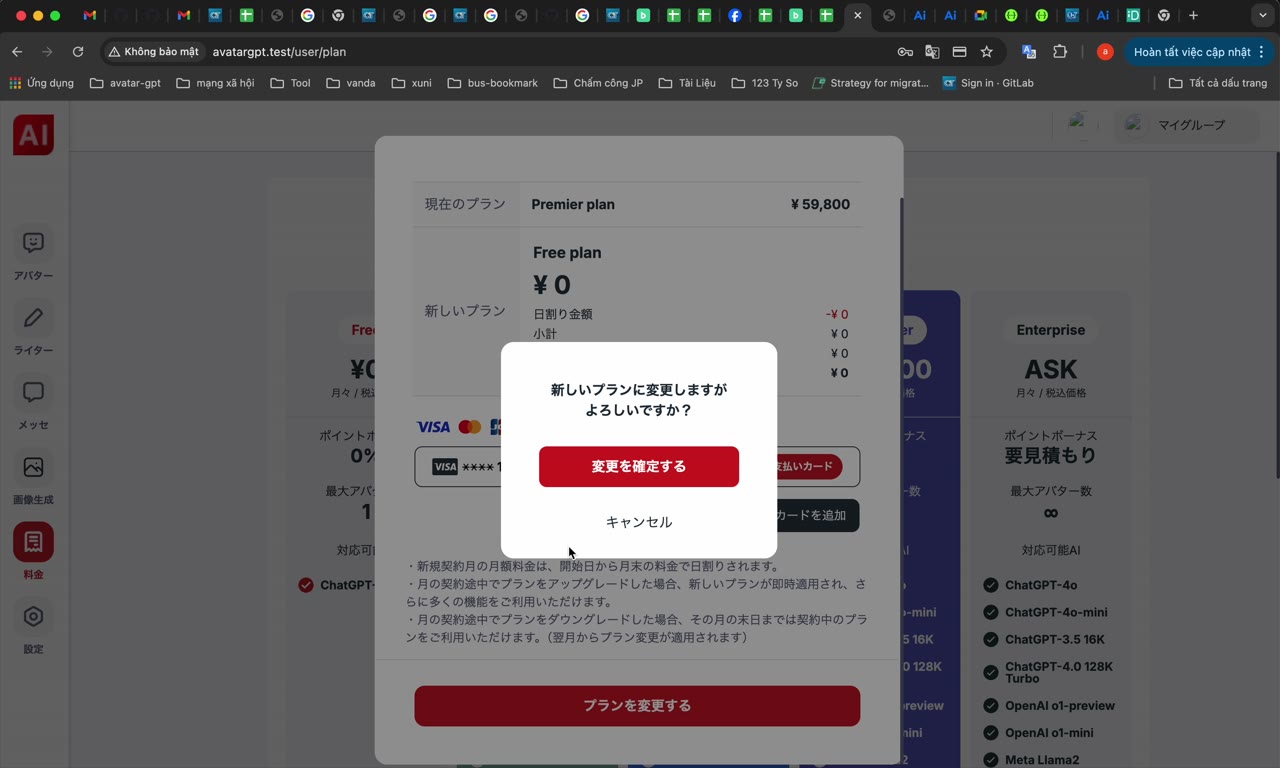
The last interactive screen is a small confirmation dialog layered over the plan comparison. The dialog asks 「無料プランに変更しますか?」, and the red 「変更を実行する」 button executes the downgrade. A grey 「キャンセル」 link backs out, and the dialog closes without changing the plan.
Nothing is submitted before the confirmation dialog appears, however complete the earlier screens looked. The two actions sit close together in a small window, so the account holder reads the button label rather than relying on position. Selecting 「キャンセル」 leaves the comparison exactly as it was, which is the safe exit when the masked row shows the wrong card.
Pressing 「変更を実行する」 closes the dialog and submits the move to Free plan ¥0. To check the result afterwards, the account holder reopens the plan-change dialog and reads the 「現在のプラン」 row. That row is the account's own statement of its plan, and the row replaces any guesswork about the colours of the pricing table.
Small confirmation dialog 「無料プランに変更しますか?」 with a red 「変更を実行する」 button and a grey 「キャンセル」 link, layered over the plan modal.
The 料金プラン page describes the tiers without moving the account
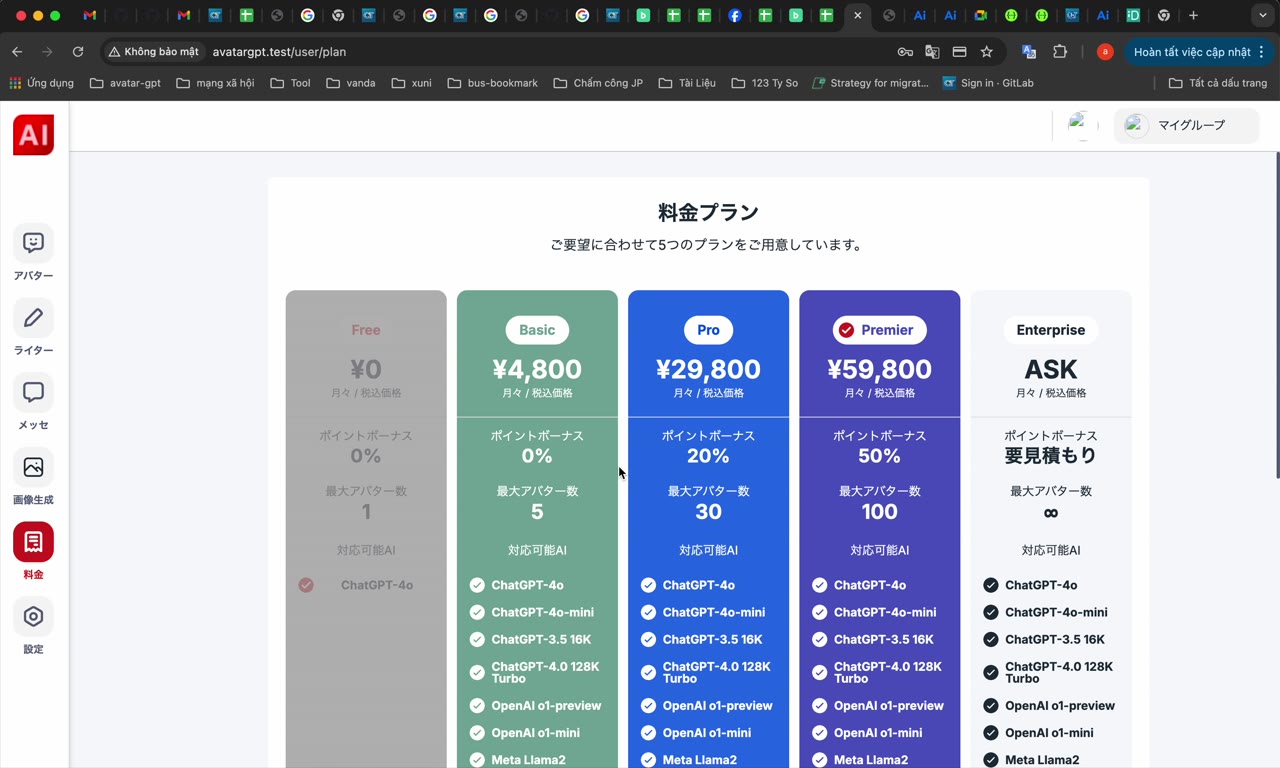
A public page titled 「料金プラン」 lays all five tiers side by side in columns. The columns run Free ¥0, ¥4,800, ¥29,800, Premium ¥59,800, and Enterprise priced as ASK rather than as a number. The Free ¥0 column is highlighted, which matches the plan named in the change dialog.
The page describes what each tier includes, and the page does not alter the subscription. The downgrade is submitted only from 「変更を実行する」 in the confirmation dialog. Keeping those two roles apart prevents a common detour in which the account holder reads the pricing table and assumes the plan changed.
Pricing page 「料金プラン」 with five columns of features and prices; the leftmost Free ¥0 column is highlighted while the others read ¥4,800, ¥29,800, ¥59,800 and Enterprise ASK.
Where the downgrade flow trips people up
Most failed attempts at moving the paid AI subscription to ¥0 come from the mismatch between the price and the paperwork. The screens themselves behave consistently, and every stage repeats without penalty. These are the recurring friction points.
Expecting no card at ¥0. The Free plan is priced at zero, but the flow still routes through 「クレジットカードを登録する」 before the confirmation dialog. The account holder budgets for the card step instead of abandoning the downgrade when the card form appears.
Mistaking the pricing table for the change dialog. The 「料金プラン」 page shows features and prices, while the 「料金プランを変更する」 modal is the screen that changes the plan.
Accepting the autofill popup by reflex. The dark suggestion panel sits directly over the card-number field and will fill a card the account holder never meant to store on this account.
Stopping at the saved-card row. A card showing 「•••• 4242」 means the card was registered, not that the plan changed. The change is submitted from 「変更を実行する」 and nowhere earlier.
Mixing up the two buttons in the last dialog. The red 「変更を実行する」 commits the downgrade, and 「キャンセル」 does not.
These points share one cause: the card form and the confirmation dialog look like parts of a single step, and the two screens are separate. Treating the card form as the price of entry and the confirmation dialog as the actual change keeps the sequence straight. The Free plan price never removes the card form.
If a step stalls, work backwards from the current screen
Every stage of the sequence is repeatable, because the subscription changes only at the final dialog. When something stalls, the account holder reads the current screen before starting over. A retry from the failing screen is faster than a restart from the dashboard.
The card modal stays open after 「送信する」. The card number, expiry and security code are read back against the physical card, because a mistyped digit or a swapped expiry is the usual cause. Card brands other than Visa, Mastercard, JCB and Amex are not advertised on the comparison screen. A card from one of those four brands is the next thing to try.
The saved-card row is missing or shows the wrong digits. 「別のカードを使用」 reopens the card form, and a new submission replaces the masked row.
The account holder has ended up on the public 「料金プラン」 page. Returning to the signed-in dashboard and reopening 「料金プランを変更する」 restores the comparison, which should still read Premium plan ¥59,800 against Free plan ¥0.
The confirmation dialog was closed by mistake. Reopening the plan-change dialog restores the comparison, and a card already on file waits in the masked row, so the card normally needs no retyping.
The outcome is unclear. Reading the 「現在のプラン」 row in the plan-change dialog settles the question, because that row states the account's plan.
The whole sequence is short: one comparison, one card form, one saved-card check and one yes-or-no dialog. Knowing that the ¥0 Free plan still asks for payment details is the difference between a stalled downgrade and a finished one. The downgrade ends with the Free plan active and a card on file.

Comments 0